

Additional Links
🛠️ Card errata, changes, and corrections 🖨️ Printable rules PDF 🏆 Tournament guidelines for organizers and judges 📖 Extended Ruleset: the complete rules reference used for judging.👪 Echoes of Astra plays great with friends! 2v2 and free-for-all rules:Multiplayer Rules
Game Overview
In Echoes of Astra, you are a Sovereign leading your forces to control the battlefield. Deploy units into combat zones, hold those zones, and score victory points (VP) until you claim victory. These rules cover a two-player game. Victory Conditions- Units in combat zones you control earn VP for you during scoring.
- You win if you have at least 20 VP at the victory check during your end phase.
- If you have no cards remaining in your deck and cannot draw during your draw phase, each opponent gains 3 VP.
Deck Construction
The five affinities in Echoes of Astra are Lux, Nox, Solara, Caelum, and Terra. Cards that do not belong to a specific affinity are Neutral.- A deck may contain cards from no more than two affinities. Neutral cards do not count toward this restriction and may be included in any deck.
- Before a match begins, each player may know which affinities are included in their opponent’s deck.
- A deck may contain no more than three copies of a card with the same name.
Side-board
In organized play, side-boarding is the modification of a player’s deck using up to 10 submitted and approved side-board cards. Side-boarding is permitted only between games or between matches.- In a best-of-three match, a player may side-board between games.
- In best-of-one matches, a player may side-board between matches, before the game begins.
- All deck construction rules still apply after side-board cards are exchanged with the main deck.
Card Layout
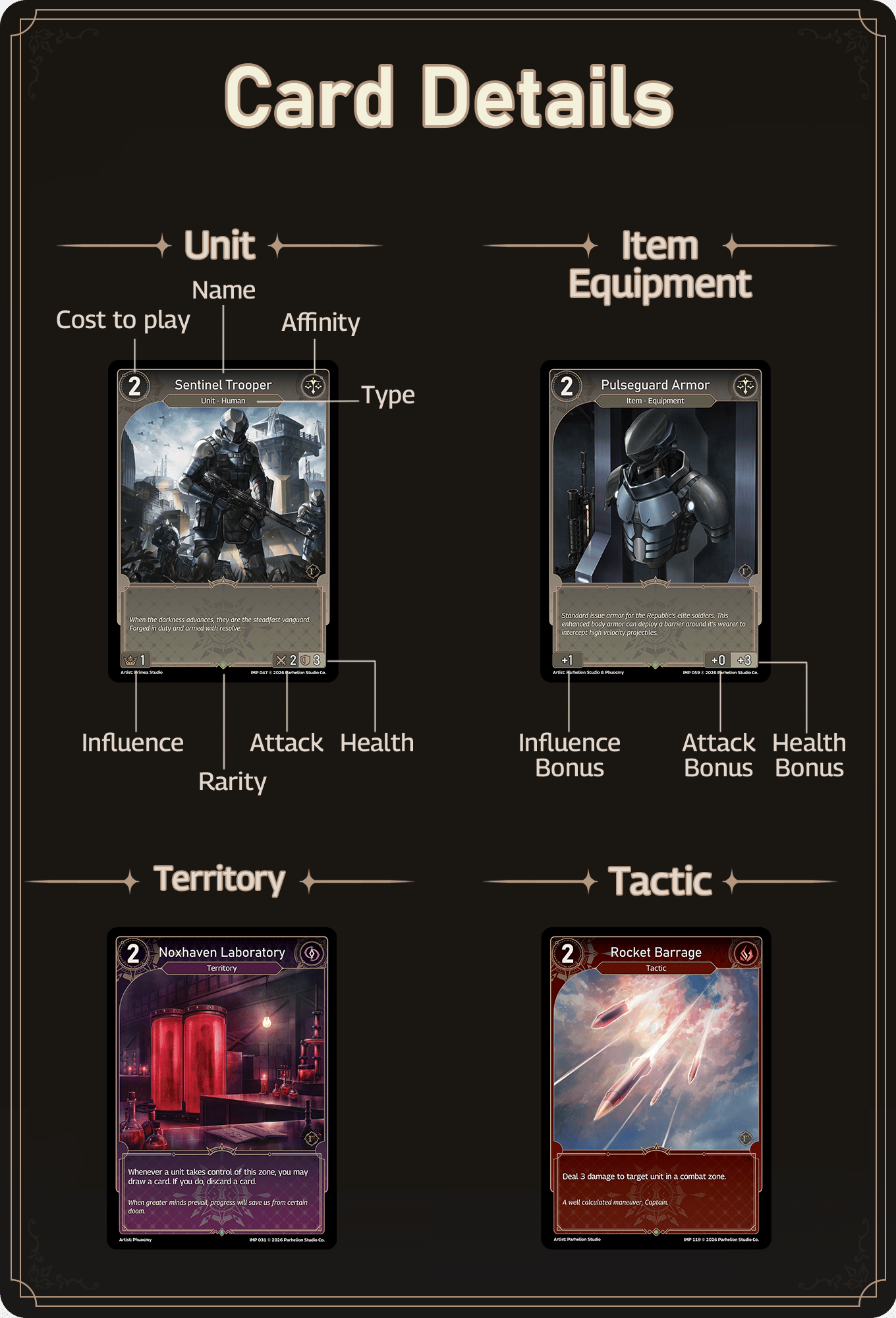
Numbers and Symbols
- Base stats are the values used for game calculations before bonuses, effects, and other modifications are applied.
- Cost, in the upper-left corner, is the amount of supply required to play the card.
- Name, at the top center, identifies copies of the card for deck construction and the Renowned rules.
- Affinity is shown by the symbol in the upper-right corner.
- Type line, below the name, shows the card’s primary type and any subtypes.
- A card has only one primary type: Unit, Tactic, Territory, or Item. A card may have any number of subtypes.
- Influence determines how many VP a unit scores for its controller.
- Attack is the combat stat referred to as “attack.”
- Health is the combat stat referred to as “health.”
Calculations
- Attack and health may be written as A/B, where A is attack and B is health.
- The symbol X may appear in place of a stat. Its value is determined during the game by the effects described in the card’s text box.
- Card stats and calculations always use whole numbers. Round any fraction down.
- Modifiers may reduce a stat below 0, but a negative stat is treated as 0 in calculations. Read more about stat modifiers.
Cards
Players bring cards into a game as part of a legally constructed deck.- A card’s owner is the player who brought it into the game as part of their deck.
- At the end of a match, or upon concession, all cards return to their owners’ decks.
- To create a permanent is to produce an instance of a card or token that did not previously exist in the game.
- Unless a zone is specified, a created non-territory permanent enters its creator’s staging area under that player’s control, exhausted.
- A permanent may be referred to by its card’s name or generically by its type.
- Example: Playing a Sylvan Archer creates a permanent with that name. On the battlefield, it is a unit. A Noxhaven Laboratory played in a combat zone is a territory.
- A permanent ceases to exist when it leaves the battlefield. The card is then reset: its effects, bonuses, counters, and modifications to ability text are removed.
Unit
A unit is a permanent created when a Unit card is played. Units enter the staging area exhausted unless an ability or effect specifies otherwise. A unit whose health reaches 0 is immediately destroyed and put into the graveyard. During your main phase, your units can take unit actions:- Attack: A ready unit may attack from the staging area into a legal combat zone (one that is empty or controlled by an opponent).
- Retreat: A ready unit may return from a combat zone to the staging area, becoming exhausted.
- Activate an ability: Pay the costs listed before the colon (:) to use the ability. A unit may do this while ready or exhausted, as long as all costs can be paid.
Read more about unit actions.
Tactic
A Tactic card produces an immediate effect. Resolve its ability text, then put the card into the graveyard. Counters- A Tactic - Counter card may be played during the counter step of combat in response to an opponent’s attack or another Counter response.
- A Tactic - Counter card may also be played as a normal tactic during your main phase.
Territory
Territories are played directly into combat zones. A territory’s abilities apply to its controller unless its text specifies otherwise.- You may play a territory face up or face down. Either way, it is a permanent.
- To play a territory face up, pay its supply cost as you would for any other card.
- To play a territory face down, do not pay its supply cost.
- On a later turn, you may pay a face-down territory’s supply cost to flip it face up, either as a Counter response or as an action during your main phase. Flipping it triggers its “On Flip” abilities.
- If a territory enters a combat zone that already contains one of your territories, the existing territory is destroyed and the new one replaces it. Each player may have no more than one territory in each combat zone.
Item
Items are permanents that provide continuing effects while on the battlefield. Equipment is the most common item type. Equipment- You may play an item and equip it to a unit in your staging area. The item’s stat bonuses and effects apply to the equipped unit immediately.
- When an equipped unit leaves the battlefield, its attached equipment is destroyed.
- An item cannot be unequipped from a unit.
- There is no limit to the number of equipment items attached to a unit.
Renowned Type
Renowned cards are unique. You cannot play a Renowned card while you control a Renowned permanent with the same name. Once that permanent leaves the battlefield, you may play another copy. If a duplicate Renowned card would enter the battlefield under your control by any means, the existing Renowned permanent is immediately sacrificed before the duplicate enters.Token
A token represents a card created by ability text. The token, or the effect creating it, specifies what it is. Examples: A Drone token, “it’s a 1/1 Drone token with 0 influence”; an Experiment token, “it’s a 2/2 unit token with 0 influence”. A token’s supply cost is always 0. Tokens enter exhausted. A token exists only on the battlefield. If it is destroyed or otherwise removed from the battlefield, it ceases to exist. Its physical representation returns to the token pile it came from.Game Setup
- Arrange the board: Arrange all zones according to the game board diagram below.
- Determine the starting player: Flip a coin or roll a die to randomly select a player. That player chooses whether to take the first or second turn.
- Draw opening hands: Each player shuffles their deck and draws six cards.
- Mulligan: Each player may shuffle their entire opening hand into their deck and draw six new cards. You may do this only once per game.
- Establish starting supply: Each player starts with one supply. Put one card from your hand face down into your supply area, then draw one replacement card.
- Begin play: The starting player takes the first turn and skips the draw phase of that turn.
Game Board
The board should provide three combat zones between the players’ staging areas. The starting player may use their own combat zone indicators. The diagram below shows the recommended standard layout. A player using an alternative layout must ensure that all zones are clearly identifiable to both players.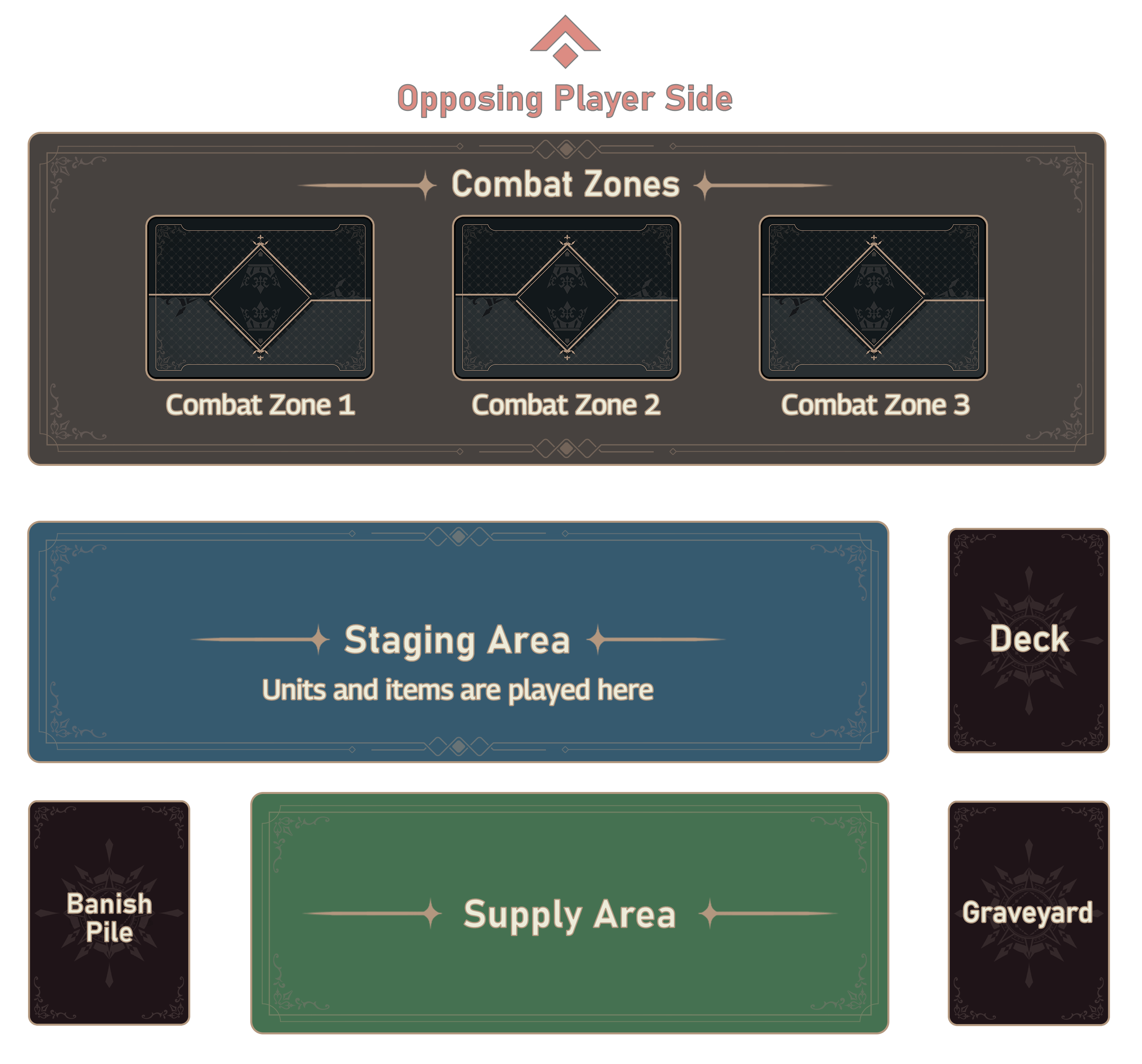
- Each player manages their own zones and the movement of cards into and out of them.
- Your supply area contains your supply cards.
Turn Structure
Ready, Start, Draw Phase
- Ready phase: Turn all cards on your side of the field upright to ready them.
- “On Ready” abilities trigger on units that became ready.
- Resolve passive or lingering effects that specify “at the start of your turn.”
- Draw phase: Draw one card from your deck. The starting player skips this phase on their first turn.
- Whenever a player fails to draw a card from their deck during the draw phase, each opponent gains 3 VP.

Main Phase
During your main phase, you may perform the following actions in any order, as long as you can pay their costs.- Extend supply: Once per turn, you may put a card from your hand face down and ready into your supply area, then draw one replacement card. This is called extending supply.
- Putting a card into the supply area through an ability effect does not count as extending supply.
- Play cards: You may play any number of cards, as long as you can pay all their costs. See Playing a Card.
- Units enter the staging area exhausted (turned sideways).
- Equipment must attach to a unit in its controller’s staging area.
- Tactics produce a one-time effect and are put into the graveyard after resolution.
- Territories are played directly into combat zones, face up or face down. A new friendly territory destroys and replaces an existing friendly territory in that zone. See Territory.
- Activate abilities: Activate abilities of cards on the board by paying the costs stated in their ability text.
- Attack with units: A ready unit in the staging area may move into a combat zone. This is an attack and immediately begins a combat phase. Resolve that combat phase before taking your next action.
- Retreat units: A ready unit in a combat zone may exhaust to return to the staging area.
Combat Phase
A combat phase begins when a unit attacks a combat zone. The entering unit is the attacker. The unit already occupying that zone, if any, is the defender. Perform the following steps in order.Ability Step
Calculate stat bonuses, territory effects, item effects, and passive bonuses from card text for the attacker, then for the defender. “On Attack” abilities trigger, followed by “On Defend” abilities. Put these effects onto the same effect stack, then resolve it.Counter Step
The defending player may make a Counter response, beginning a Counter stack. Players may respond to each other’s Counter responses with further Counter responses.- Counter responses include playing Counter cards, activating unit abilities, and flipping face-down territories face up. You must pay all costs to make a Counter response.
- A card played as a Counter response enters the battlefield only when its entry on the stack resolves.
- “On Play” abilities trigger when a card is successfully played. “On Enter” abilities trigger when a permanent enters the battlefield. Putting a card on the Counter stack does not play it or cause it to enter, so these abilities trigger only when its entry resolves.
- Whenever a Counter response is made, opponents receive priority to respond. If all opponents decline, resolve the stack.
- The stack resolves in last-in, first-out order before combat resumes.
- If an ability triggers during resolution, add its effect to the stack and resolve it immediately.
See Order of Operations for more details.
- Participant replacement: Effects resolving on the stack may forcibly move units.
- An attacker or defender that leaves the combat zone loses that designation.
- A unit put or moved into the combat zone during the counter step joins that combat. It becomes the defender controlling the zone (if the other unit is the attacker) or the attacker (if the other unit is the defender).
- If the combat already has both an attacker and a defender, no other unit may enter that combat zone. A unit that attempts to enter returns to where it came from.
Target Validation
After the counter step, if either the attacker or the defender is absent, skip the combat damage step and go to the resolution step.Combat Damage Step
The attacker and defender deal combat damage to each other simultaneously.- Combat damage is the damage dealt between the attacker and defender during this step. It is determined by the unit’s attack stat plus applicable stat counters and abilities.
- Only ready units deal combat damage.
- A surviving unit keeps its damage until the end of the turn.
- A unit that attempted to deal combat damage becomes exhausted, even if it attempted to deal 0 damage.
Resolution Step
- If only the attacker remains in the combat zone, it takes control of that zone.
- If both units survive, the attacker returns to the zone it attacked from. Control of the combat zone does not change.
- If only the defender remains, control of the combat zone does not change.
Additional Combat Rules
- Recursive combat: An ability may cause a unit to attack during another combat phase. A combat zone where combat is already in progress cannot be attacked.
- Participants: A combat phase has no more than one attacker and one defender. A unit that leaves the combat zone loses its attacker or defender designation.
- Restricted zones: A unit cannot attack a combat zone that contains a friendly unit or where combat is already in progress.
- Ability effects may add restrictions on which combat zones a unit can attack.
- Example: Provoke requires an attacking unit to target a combat zone containing an enemy unit with Provoke. An attack against a different combat zone fails because it does not meet that restriction.
- Return to origin: A unit that fails to win a combat zone returns to the zone it came from.
- Returning to a zone is not an attack.
- If the unit would return to a combat zone that is occupied or that it cannot legally control, it returns to the staging area instead.
End Phase
The end phase begins when you declare the end of your turn. Perform the following steps in order:- Scoring: Add the total influence of your units in combat zones to your VP. After scoring is complete, “On Score” abilities trigger for all units that participated in scoring.
- Damage reset: Remove damage from all units.
- End-of-turn effects: Resolve passive or lingering effects that specify “at the end of your turn.”
- Hand limit: If you have more than 10 cards in hand, discard until you have 10.
- Victory check: If you have at least 20 VP, you win the game!
Game Mechanics
Card Privacy
- Hidden information is not available for any player to look at freely. Hidden cards are kept face down or in a pile of hidden cards, such as the deck.
- Private information is available only to the card’s owner, such as the cards in your hand. You may look at your private cards freely.
- Public information includes cards that have been revealed or played face up. A public card must be face up and visible to all players.
- A player may ask to read a public card. If a card is moved for reading, return it to its previous position before play continues.
Privacy State Changes
When a card leaves the battlefield, it is reset. Destroying, banishing, or otherwise removing a card from the battlefield removes any abilities and counters it gained. When a card moves between zones, its privacy state may change to match the destination zone.- A public card moved into the deck becomes hidden. A public card moved into the supply area becomes private.
- The banish pile cannot contain hidden cards. A hidden card that is banished becomes private, and its owner may look at it.
The Field of Play (Battlefield)
The battlefield is made up of the zones where unit permanents can exist: both players’ staging areas and all combat zones.- The deck, hand, supply area, graveyard, and banish pile are not part of the battlefield.
- A token is a permanent only while on the battlefield. Removing a token from the battlefield removes it from the game.
Combat Zones (Public)
Combat zones are shared zones in the center of the field. A standard game has three combat zones, and either player may control each one.- Occupy and control: You occupy and control a combat zone when a unit you control is alone in that zone.
- A unit may still take actions (exhaust, sacrifice, retreat, and so on) while in a combat zone.
- Territories are played from your hand directly into a combat zone, face up (public) or face down (private). See Territory.
- Each combat zone may contain no more than one territory per player.
❓ What counts as “in a combat zone”? An attacking unit and a unit controlling a combat zone are both in that zone. During combat, both the attacker and the defender are in the combat zone.
Staging Area (Public)
Each player has their own staging area. Units, items, and tactics are played in your staging area. Units enter the staging area exhausted unless an ability or effect specifies otherwise.Deck (Hidden)
Your deck is the face-down pile of cards you bring into the game. It must follow the deck construction rules of the format being played.Hand (Private)
Each player has their own hand. An effect may target cards in a hand only if it specifies that zone. The maximum hand size is 10 cards. If you have more than 10 cards in hand at the end of your turn, discard until you have 10.Supply Area (Private)
Each player has their own supply area. A card sent to the supply area is turned face down and becomes a supply card, whether it got there by extending supply or by an ability effect.Graveyard (Public)
Each player has their own graveyard. A destroyed, discarded, or sacrificed card is put into its owner’s graveyard and becomes public. A tactic is put into its owner’s graveyard after its effect resolves.Banish Pile (Public/Private)
Each player has their own banish pile. The banish pile holds cards removed from play by banishment. Effects may also use it to hold cards temporarily while they are being processed. A banished card keeps the privacy state it had before it was banished. Hidden cards become private (see Privacy State Changes).Supply Mechanics
Extending Supply
Once during your main phase each turn, you may put a card from your hand face down into your supply area. That supply card enters ready and can be used that turn.- Replacement: When you extend supply this way, draw one replacement card.
- Ability exceptions: Abilities such as Airdrop may put additional cards into the supply area. This does not count as extending supply and does not cause a replacement draw.
Supply Consumption
Exhausting a supply card produces one floating supply for you to spend during the turn.- The turn player may exhaust cards in their supply area at any time to produce floating supply.
- Floating supply remains available until the end of the turn player’s end phase.
- Any player may exhaust supply cards at any time to generate the supply needed to play a legal card.
- A card with an ability that produces supply is not a supply card. You cannot freely exhaust it to pay for another card.
Playing a Card
To play a card is to pay all required costs to put that card onto the battlefield. You normally play cards from your hand during your own main phase, unless a rule or effect permits otherwise (for example, Counter cards).- Extending supply is not playing a card.
Resource Costs
- Supply cost: A card’s supply cost is in its upper-left corner. You must spend that much supply to play the card.
- Additional costs: Some cards list additional costs, such as sacrificing a unit or discarding a card. Pay these as the card is played. For a Counter response, pay all costs when you add the card to the Counter stack, not again when it resolves.
- Free play: If an effect lets you play a card “for free,” you do not pay its supply cost or its additional costs.
Timing
- Main phase: You may play cards only during your own main phase, unless an ability’s resolution instructs otherwise.
- Counter cards: Counter cards may be played during combat’s counter step in response to an opponent’s attack or another Counter response.
- Passive abilities: An ability with no activation cost and no trigger condition is passive. It applies continuously while its card is on the battlefield, subject to any conditions in its text.
Target Requirements
- A tactic that requires a target cannot be played unless a legal target is available.
- If a player attempts to play a tactic without a legal target, restore the game state to the point immediately before that attempt.
- If a target was legal when the tactic was played but becomes illegal before the effect resolves, the targeted portion of the effect fails to resolve. The tactic is still put into the graveyard.
Placement Rules
- Units enter your staging area exhausted.
- Items enter the staging area ready to be equipped.
- Territories are played directly into a combat zone.
- Tactics produce their effects immediately and are then put into the graveyard.
Play Restrictions
- Game-state restrictions: Some cards can be played only under certain conditions, such as “Play only if you control three units.” The card cannot be played unless that condition is met.
- Renowned: You cannot play a Renowned card while you control a Renowned permanent with the same name. See Renowned Type.
Unit Actions
A unit is either ready (upright) or exhausted (sideways). Units enter the battlefield exhausted by default. During your main phase, a ready unit may attack or retreat. A unit may activate an ability whether it is ready or exhausted, as long as all costs can be paid. An exhausted unit cannot pay a cost that requires it to exhaust.Attack
- A ready unit may attack from the staging area into a combat zone. An attack always begins a combat phase, even if the zone is empty.
- To attack a combat zone, the attacker must first be allowed to target the unit occupying the zone, if any. It must then be allowed to attack the zone itself. If either requirement is not met, the attack is illegal and does not happen.
- You cannot attack a combat zone you already control.
- A unit cannot attack from one combat zone into another unless a rule or ability permits it, such as Flanking.
Retreat
- A ready unit in a combat zone may retreat. Move it to the staging area, then exhaust it.
- A forced retreat or movement caused by an effect does not require the unit to be ready.
Example: An exhausted Sylvan Archer is in a combat zone. In response to an enemy attack, you play Swift Acrobatics (“Force retreat target friendly unit in a combat zone…”). The Archer retreats even though it is exhausted.
Activate Ability
- An ability without a cost or trigger is passive and is active as soon as the unit is on the battlefield.
- You activate an activated ability by paying all its costs. You may do this during your main phase, or as a Counter response during any player’s counter step. See Unit Abilities in the Counter Step.
- An activated ability’s costs appear before a colon (:). Costs may include sacrificing a card, paying VP, exhausting a card, or paying supply.
Example: Valrathian Commissar: {Exhaust}, Sacrifice a unit: Target opponent loses 1 victory point.
Move
Move is not a player action. When an effect moves a card or unit, put it in the zone the effect specifies.- Being moved by an effect does not, by itself, ready or exhaust a unit. A unit made to retreat or force retreat returns to its controller’s staging area exhausted.
Card Abilities
Card Text Precedence
If a card’s text contradicts these rules, the card’s text takes precedence. In ability text, “card” refers to cards in your deck and other non-battlefield zones. If one effect prohibits an action and another permits it, the prohibition wins. Can’t beats can. When resolving an effect, do as much of it as possible and ignore any instructions that cannot be performed. Phrases such as “On Enter” and “On Defend” identify the events that trigger abilities.See the Keyword Glossary at the end of these rules for a description of each trigger.
Unit Abilities in the Counter Step
An ability with a cost before a colon (:) may be activated as a Counter response during the counter step.- You must be able to pay all activation costs (for example, sacrifice, pay supply, or exhaust).
- Like other Counter responses, it must respond to an attack or to an opponent’s Counter response.
Stacking Abilities
A unit may have multiple instances of the same ability from different sources. Each instance applies separately.- Example: Player 1 has a Canopy Stalker (Impede 1: “On Defend: Attacking enemy unit gets -1/-0 this combat”) in a combat zone with an Escape Route territory (Impede 2).
- The Canopy Stalker is attacked by an enemy unit with 4 attack.
- Both Impede effects apply (-1/-0 and -2/-0), so the enemy unit deals only 1 damage.
Selection & Targeting
Many cards let players target or select other cards. The following rules govern targeting.Basic Targeting Rules
- Visibility: You may target only cards that are visible to you as public information.
- Declaration: If an effect uses the word “target,” declare your targets when you activate the ability, before the effect resolves.
- No legal target: If no target is available, or a chosen target is no longer legal when the effect resolves, the targeted portion of the effect fails to resolve.
Target Restrictions
- Zone restrictions: Cards may target only cards in staging areas or combat zones unless their text explicitly permits another zone.
- Type restrictions: A target must match any type the effect specifies, such as “target unit” or “target equipment.”
- Controller restrictions: “Friendly” means controlled by you. “Enemy” means controlled by an opponent.
- “Cannot be targeted”: An ability that says a card cannot be targeted by certain effects overrides the normal targeting rules for those effects.
- Prohibited actions: An effect that instructs an action does not override an effect that prohibits it. For example, “this unit attacks target combat zone” cannot attack a zone that another effect prevents it from attacking.
Global Effects
Effects using phrases such as “all units” or “each territory” affect multiple cards without targeting them. These effects are not stopped by “cannot be targeted” protections.Counter Step / Effect Stack
The Counter stack is the sequence of responses added during the counter step of combat.- The defending player has priority to make the first Counter response to an attack.
- If the attacked zone has no defender, any opponent may make the first Counter response. In multiplayer games, priority passes around the table until a player chooses to respond.
- After a player makes a Counter response, opponents may make Counter responses of their own.
- Each new response is placed on top of the stack.
- The stack resolves from top to bottom: the last response added resolves first (last-in, first-out). Once resolution begins, players cannot add new Counter responses.
- An effect on the stack exists independently of its source. If the source unit leaves the battlefield, its effect still resolves.
- Playing a Tactic - Counter card.
- Flipping a face-down territory face up.
- Playing a unit with Swift.
- Activating a unit ability whose costs you can pay, such as Valrathian Commissar’s sacrifice ability. See Unit Actions.
- A triggered effect, such as an “On Death” effect, may be added to the stack after resolution begins. The new effect is on top of the stack and resolves before the effects below it.
- If multiple abilities trigger at the same time, follow Order of Operations.
💡 If a target becomes illegal during resolution, the remaining Counter responses still resolve, although they may have no effect.
Order of Operations
If abilities belonging to multiple players trigger at the same time, the turn player’s effects go on the stack first, then the other player’s. After all simultaneous triggers are added, resolve the stack. This order is known as APNAP (active player, non-active player). If multiple abilities controlled by the same player trigger at the same time, that player chooses their order and declares it before resolution begins. For abilities of permanents, the player who controls the permanent makes this choice, not the card’s owner.Effect Resolution Order
A card effect is the result of any card text, whether activated, triggered, or passively applied. Abilities that trigger in sequence are added to an effect stack. When no more effects are being added, resolve the top effect first and work downward. This is called “last-in, first-out.” A Counter card played during the counter step is placed on the stack. It is not played until its entry resolves. Once it is played, its abilities trigger and are added to the stack.- Example: Two units destroy each other in combat, and each has an “On Death” ability. The turn player’s ability adds Effect A to the stack first. The other player’s ability then adds Effect B. Effect B resolves before Effect A.
- Example: Two of your cards with “On Enter” abilities enter the battlefield at the same time. You choose the order in which their abilities trigger.
1
You control a 3/2 Synthal Vampire in a combat zone (“Whenever you play a tactic during your turn, this unit gets +1/+1 until end of turn.”).
2
You play Yako Illusionist (“On Enter: Choose a target enemy unit in an opponent’s staging area and ready it. It immediately attacks a combat zone of your choosing.”).
- Yako Illusionist’s ability targets your opponent’s Nocturne Agent.
3
- The opponent’s 3/3 Nocturne Agent attacks your Synthal Vampire.
4
- You respond with Enrage (“Give target friendly unit +1/+0 until end of turn and ready it.”), targeting Synthal Vampire. With Enrage and the Vampire’s own ability, it would become 5/3.
5
- Your opponent responds with Emergency Extraction (“Return a friendly unit or item to your hand.”), targeting Nocturne Agent so it is not destroyed in combat.
6
- Resolution: The Counter stack contains Enrage below Emergency Extraction.
- Emergency Extraction resolves first and returns Nocturne Agent to your opponent’s hand.
- Enrage is played, giving Synthal Vampire +1/+0 and readying it.
- Synthal Vampire’s ability triggers, is added to the stack, and immediately resolves, giving it another +1/+1 because you played a tactic.
- Nocturne Agent is no longer in the combat zone, so combat proceeds to resolution with no combat damage and no change of control.
”Each player” Order
An instruction stating “Each player does [X]” resolves starting with the turn player and progressing in player order.”On Death”, “Whenever unit dies”, “Destroyed”
A unit dies when it is destroyed. Destroyed means a card is sent to the graveyard. When a unit is destroyed, follow these steps:- Check which death-triggered abilities trigger, using the battlefield as it was just before the unit left. This includes “On Death” abilities on the unit, abilities on its attached equipment, and “whenever a unit dies” abilities on other permanents.
- Put the unit into its owner’s graveyard and destroy its attached equipment.
- Add the triggered abilities to the stack following APNAP order, then resolve them.
- Fearless Whelp, Lifecycle Katana, and Elorhain, the Ancestral Crown each have an ability that triggers on the Whelp’s death. You choose their order.
- You could order them so Fearless Whelp’s and Elorhain’s effects draw you 2 cards before Lifecycle Katana’s effect puts Fearless Whelp on top of your deck.
Scoring and Victory Points (VP)
Each player starts with 0 victory points (VP). You win the game if you have at least 20 VP during the victory check of your end phase.- VP cannot go below 0. If you are at 0 VP, effects that would reduce your VP do nothing.
- An ability with a VP cost can be activated only if the entire cost is paid.
- If you have no cards remaining in your deck and cannot draw during your draw phase, each opponent gains 3 VP.
- Scoring is mandatory.
- A unit with 0 influence scores 0 VP but still triggers its “On Score” abilities.
Stat Counters / Modifiers
A counter is a tracker that shows a modified state on a card. Counters can be represented by dice, tokens, or any method the players agree on. These are different from Counter responses during combat.- Card text specifies how counters are added to or removed from the card itself or a target.
- Counters remain for the duration stated in the effect or until the card leaves the battlefield. A card that is destroyed, returned to hand, or banished loses its counters and is reset.
Stat Modifiers
A stat modifier changes a unit’s stats by the stated amount for the effect’s duration. For example, a +1/+1 modifier increases a unit’s attack and health by 1 while it applies.- Apply stat modifiers to a unit’s base stats whenever that stat is used (combat, abilities, actions, or other effects).
- Example: A Guinea Pig equipped with a Disruption Staff attacks a combat zone containing an enemy Valrathian Dreadnought and an Ashfang Rallypoint (“Units in this zone have 3 base attack and health”).
- Result: Guinea Pig’s base stats become 3/3 before the equipment’s +1/+1 applies. Valrathian Dreadnought’s base stats also become 3/3. Guinea Pig survives combat with 1 health remaining.
- If a negative stat modifier reduces a unit’s health to 0 or less, that unit is immediately destroyed.
- Modifiers can reduce a stat below 0, but any calculation using that stat treats it as 0.
- Example: A 2/2 unit gets -3/-0, leaving it with -1 attack. When it deals combat damage, its attack counts as 0.
Ability Counters
Some cards ask you to track a number that goes up or down. Use dice, coins, or other markers to track it, adding or removing counters as the card instructs.Change of Control / Controller
Some abilities, such as that of Nerezza, Umbrasco Scion, change control of a permanent on the battlefield. A permanent that changes control this way is called stolen. The new controller treats a stolen permanent as their own. The permanent is reset before control changes.- A stolen unit moves to the new controller’s staging area exhausted. Its attached equipment is destroyed, and its temporary effects, damage, and counters are removed.
- A stolen territory moves to the new controller’s side of the same combat zone. If the new controller already has a territory there, it is destroyed and replaced by the stolen territory.
- A stolen item moves to the new controller’s staging area. Equipment must be equipped to a unit in that staging area, or it is destroyed.
- Example: Returning a stolen unit to hand returns it to its owner’s hand.
- Example: Destroying a stolen unit puts it into its owner’s graveyard. Its “On Death” effects trigger first.
- Example: An effect that would send a stolen card to the new controller’s supply area sends it to its owner’s supply area instead.
Keyword Glossary
The following tables define trigger phrases, common terms, and keyword abilities.Ability Activation Phases
| Term | Definition |
|---|---|
| ”At the END of turn” | Triggers after scoring, immediately after damage is reset. Applies to abilities using the phrase “end of your turn." |
| "At the START of turn” | Triggers after cards are readied and before the draw phase. Applies to abilities using the phrase “start of your turn.” |
| On Attack | Triggers when the unit moves into a combat zone, during the ability step. |
| On Death | Triggers when this card is put into the graveyard from the battlefield. |
| On Defend | Triggers when the unit defends against an attacker, during the ability step. |
| On Enter | Triggers when the card enters the battlefield from any zone. |
| On Flip | Triggers when the card is revealed from a face-down position. |
| On Play | Triggers when a player plays the card (pays all required costs to put it onto the battlefield) and it enters the battlefield. Some effects let you play a card from zones other than your hand. |
| On Ready | Triggers when an exhausted card becomes ready. |
| On Retreat | Triggers when a unit returns from a combat zone to its controller’s staging area. |
| On Score | Triggers for units that participated in scoring, after VP is added during the first step of the end phase. |
Common Terminology
| Term | Definition |
|---|---|
| (Stat) Attack / ATK | The stat used to determine damage dealt in combat. |
| (Stat) Health / HP | The stat showing how much damage a unit can survive. |
| (Stat) Influence | The stat showing how many VP a unit in a combat zone earns during scoring. |
| Ability | A card’s effect text. |
| Banish(ed) | Remove a card from play by putting it into the banish pile rather than the graveyard. A unit leaving the battlefield loses its counters, equipment, and added card text. |
| Combat Damage | Damage dealt between the attacker and defender during the combat damage step. |
| Control [zone] | A player controls a combat zone when their unit occupies it. Control is lost when no friendly unit remains in the zone. During combat, control changes after the resolution step. |
| Controller | The player currently able to play, use, or move a card. A card’s controller may differ from its owner. A unit leaving the battlefield goes to its owner’s matching zone. |
| Counter | An ability usable during the counter step in response to an attack or another Counter response. |
| Destroy(ed) | Send a card to the graveyard. A unit leaving the battlefield loses its counters, equipment, and added card text. |
| Discard(ed) | Move a card from hand to the graveyard. |
| Effect | The result of an ability, Counter response, tactic, or unit text. |
| Exhaust(ed) | The sideways state of a card. An exhausted unit cannot attack, retreat as a unit action, deal combat damage, or pay a cost that requires it to exhaust. It can still trigger abilities and activate abilities whose costs it can pay. |
| Force Retreat | Return a unit to its controller’s staging area exhausted. A retreat caused by an ability is not a unit action and does not require the unit to be ready. |
| Move | Move a card to a specified location. |
| Occupy | A unit occupies a zone when it is alone in that zone or defending it. |
| Owner | The player who brought the card into the game as part of their deck. Ownership does not change when control changes. |
| Permanent | A played instance of a unit, territory, or item card (or a token) on the battlefield. |
| Ready | The upright state in which a unit can take an action and deal damage. |
| Reset | Remove temporary effects, targeted effects, added text, counters, and damage from a permanent, and destroy any equipment attached to it. Treat it as a fresh card. |
| Sacrifice(d) | Choose a friendly unit, territory, or item on the battlefield and destroy it, putting it into the graveyard. |
| Supply | The resource spent to play cards. A card’s supply cost is the number in its upper-left corner. |
| Turn Player | The player whose turn is in progress. Also called the “active player.” |
| Unit Action - Activate Ability | Pay all required costs to activate a unit’s ability. |
| Unit Action - Attack | Move a unit into a combat zone as an attack, even if the zone is empty. A unit cannot attack a zone containing a friendly unit or a combat in progress. |
| Unit Action - Retreat | Move a unit from a combat zone to the staging area and exhaust it. |
| Unoccupied | A combat zone with no units in it. |
Bolded Keywords
| Term | Definition |
|---|---|
| Blitz | This unit enters ready. |
| Flanking | This unit may attack from a combat zone once per turn, including while it controls that zone. |
| Fortify | On Defend: You may discard a card with matching affinity to ready this unit. |
| Glory X | Whenever this unit destroys a defending unit through combat damage, its controller gains X VP. |
| Impede X | On Defend: The attacking enemy unit gets -X/-0 for this combat. |
| Provoke | While this unit controls a combat zone, opponents must target a unit with Provoke when attacking. |
| Swift | This card may be played as a Counter response. |